
Last updated: June 2026 | 7 minute read
Affiliate disclosure: VPN Region is reader-supported. When you buy a VPN through links on our site, we may earn a commission at no extra cost to you. This never affects which VPNs we recommend — our rankings are based on our own testing. Learn more.
Small businesses are the biggest targets
If you run a small business, you might think you’re too small to be on a hacker’s radar. The data says otherwise. According to Verizon’s 2024 Data Breach Investigations Report, small and medium businesses account for over 40% of all reported breaches — and the percentage is growing every year.
Why? Because attackers know two things: small businesses hold valuable customer data (cards, addresses, emails, login credentials), and most of them don’t invest in serious security. That makes them easy targets — and the consequences are brutal. A single data breach costs a small business an average of $200,000, and over 60% of breached small businesses close within six months.
You don’t need an enterprise security team to fix this. You need to do five things consistently.
5 ways small businesses can secure customer data
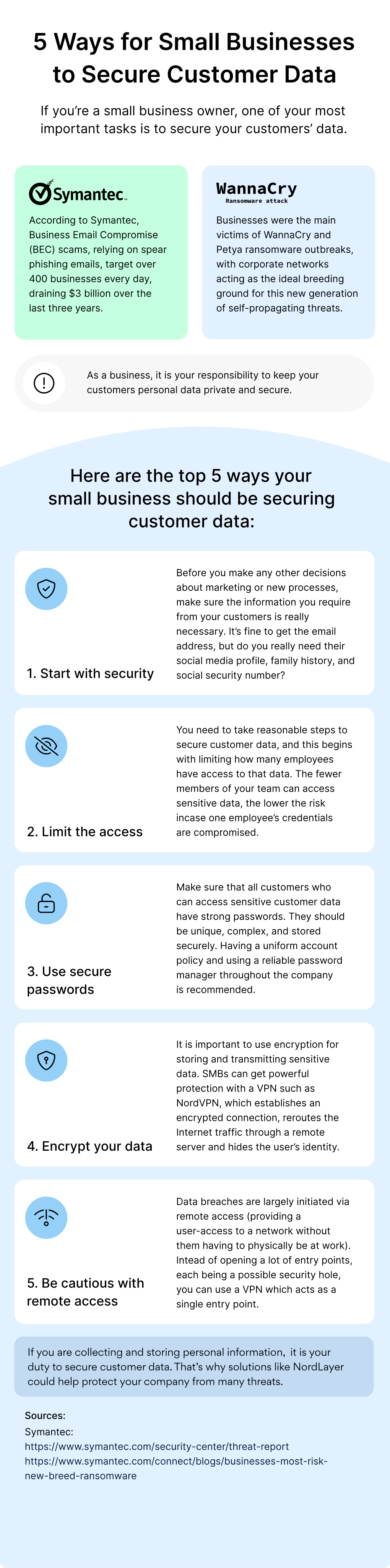
1. Start with security: collect only what you need
The most secure data is the data you never collected in the first place. Before designing any sign-up form, checkout flow, or marketing campaign, ask: do we actually need this information?
It’s tempting to ask for everything “just in case” — birthdays for marketing, social media profiles for analytics, family history for some future use case. Don’t. Each additional field is another liability if you get breached. Every piece of customer data you store is a piece of data that can be stolen.
Practical rule: collect email and what’s necessary for the transaction. Add fields only when there’s a clear, concrete business need — not “maybe we’ll use this later.”
2. Limit access to sensitive data
Most small business breaches happen through compromised employee accounts — not sophisticated hacks. If everyone on your team has access to all customer data, then one phishing email to the wrong person can expose your entire database.
Apply the principle of least privilege: each employee gets access to only the data they need for their specific role. Your marketing intern doesn’t need access to credit card details. Your customer support agent doesn’t need to see internal financial records.
Practical steps:
- Set up role-based access in every tool you use (CRM, email, cloud storage, payment system)
- Review access permissions quarterly — remove access for people who switched roles or left
- Use admin accounts only when necessary; use regular accounts for daily work
- Log who accesses sensitive data, and when
3. Use strong, unique passwords across the company
One weak password can compromise your entire business. If your accountant uses “Company2024!” for the bookkeeping software, and that password leaks in any other breach, attackers can now access your financials.
The solution is straightforward: deploy a business password manager for the entire team. This costs less than $10 per user per month and solves multiple problems at once:
- Every account gets a unique, 16+ character password
- Passwords are stored encrypted, not in spreadsheets or sticky notes
- Sharing credentials with team members happens securely
- When someone leaves the company, you revoke their access in one click
For more on password security, see our guide on how to create strong passwords.
4. Encrypt data in transit and at rest
Encryption sounds technical, but it’s actually simple: it means data is scrambled into unreadable form unless you have the key to unscramble it. Even if someone steals your data, they can’t use it without the key.
You need encryption in two places:
- In transit: when data travels between your devices, employees, and customers (use HTTPS on your website, encrypted email, and a VPN for remote work)
- At rest: when data sits on your servers, hard drives, and backups (most modern databases and cloud services offer this; just make sure it’s enabled)
For remote teams especially, a business VPN is essential. When your employee logs into the company CRM from a coffee shop, their connection should be encrypted end-to-end. Without a VPN, the data flows through public Wi-Fi where anyone can intercept it.
5. Be cautious with remote access
Remote work expanded the attack surface for every business. Each employee working from home, traveling, or accessing systems via mobile creates a potential entry point for attackers.
Best practices for safe remote access:
- Require VPN access for any connection to internal systems — no exceptions
- Enable two-factor authentication on every account, especially admin and finance accounts
- Use a single sign-on (SSO) solution if possible — fewer passwords means fewer chances to get them stolen
- Monitor login attempts — most modern services flag unusual logins from new countries or devices
- Train employees on common phishing tactics; the human factor is usually the weakest link
The cost of doing nothing
Beyond direct financial loss, a data breach destroys customer trust. According to recent surveys, over 80% of customers say they would stop doing business with a company after a serious data breach. The reputational damage often outlasts the financial damage.
There are also legal consequences. Most countries have data protection laws (GDPR in Europe, CCPA in California, similar laws elsewhere) that require businesses to protect customer data and report breaches within tight timeframes. Fines can reach millions of dollars even for small businesses that mishandle data.
Where a business VPN fits in
For small businesses, a VPN is no longer optional — it’s foundational infrastructure. A business VPN handles several of the security gaps mentioned above in one solution:
- Encrypts all employee traffic, whether they’re at the office, at home, or traveling
- Hides company IP addresses, making it harder for attackers to target your infrastructure
- Provides secure access to internal tools without exposing them to the public internet
- Protects against man-in-the-middle attacks on public Wi-Fi (a common scenario for remote workers)
- Often includes additional features like threat protection, malware blocking, and password management
For the businesses we work with, we recommend NordVPN (or its business-focused sibling, NordLayer). NordVPN uses AES-256 encryption — the same standard used by banks and governments — runs an independently audited no-logs policy, and is affordable enough for any small business budget.
Protect your business and your customers.
Get NordVPN with up to 74% off and try it risk-free for 30 days.
A simple security checklist for small businesses
Use this checklist to audit your current security posture. Each item is something you can implement this week without specialized expertise.
- ✅ Review what customer data you collect — eliminate anything unnecessary
- ✅ Set up role-based access in every business tool
- ✅ Deploy a password manager for the entire team
- ✅ Enable two-factor authentication on every account that supports it
- ✅ Use a VPN for all remote access to company systems
- ✅ Make sure your website uses HTTPS
- ✅ Encrypt employee laptops and phones
- ✅ Set up automatic backups (encrypted) for critical data
- ✅ Train your team on phishing and social engineering — quarterly, not once
- ✅ Have a written incident response plan (even a simple one)
What to do if you get breached
If you discover a breach has happened, act fast:
- Contain the damage — change passwords on affected accounts, isolate compromised systems
- Document everything — what was accessed, when, by whom (or what)
- Notify affected customers — required by law in most countries, and the right thing to do regardless
- Report to authorities — most regions require breach notifications within 72 hours
- Get professional help — for serious breaches, hire a cybersecurity firm to assess and remediate
- Review what failed — and implement changes so it doesn’t happen again
Final thoughts
Securing customer data isn’t about achieving perfect security — it’s about being significantly harder to breach than the average business. Attackers go for low-hanging fruit. The five practices in this guide put you above that line.
The smallest businesses often think security is too expensive or too complex. The truth is: most of the steps above are either free or cost less than the average insurance policy. Compared to the cost of recovering from a breach — let alone the reputational damage — they’re a bargain.
Continue reading
- How to Create Strong Passwords (7 Mistakes to Avoid)
- The Dark Business of Stolen Data
- Safe Online Shopping: 5 Essential Tips
- Stay Safe Online: Your Digital Security Hub