
Last updated: June 2026 | 7 minute read
Affiliate disclosure: VPN Region is reader-supported. When you buy a VPN through links on our site, we may earn a commission at no extra cost to you. This never affects which VPNs we recommend — our rankings are based on our own testing. Learn more.
Your data is a commodity — whether you like it or not
Every time your data is stolen — in a breach, through phishing, or via malware — it doesn’t just disappear into the void. It enters a global marketplace, gets bundled with millions of other records, and sells for surprisingly little money. According to IBM’s Cost of a Data Breach Report, the average breach now exposes data from millions of users — and that data has a real, calculable price.
A full identity package (name, address, SSN, credit card, login credentials) sells for as little as $30-100 on dark web markets. Your Netflix login? About $4. A bank account with $2,000 in it? Around $60. The economy is brutal and efficient.
Understanding how this works isn’t just academic — it’s the first step in protecting yourself. Here’s how stolen data flows from victim to buyer.
The complete picture
The infographic below shows the full lifecycle of stolen data: how it’s collected, where it’s sold, why it’s bought, and how to protect yourself.
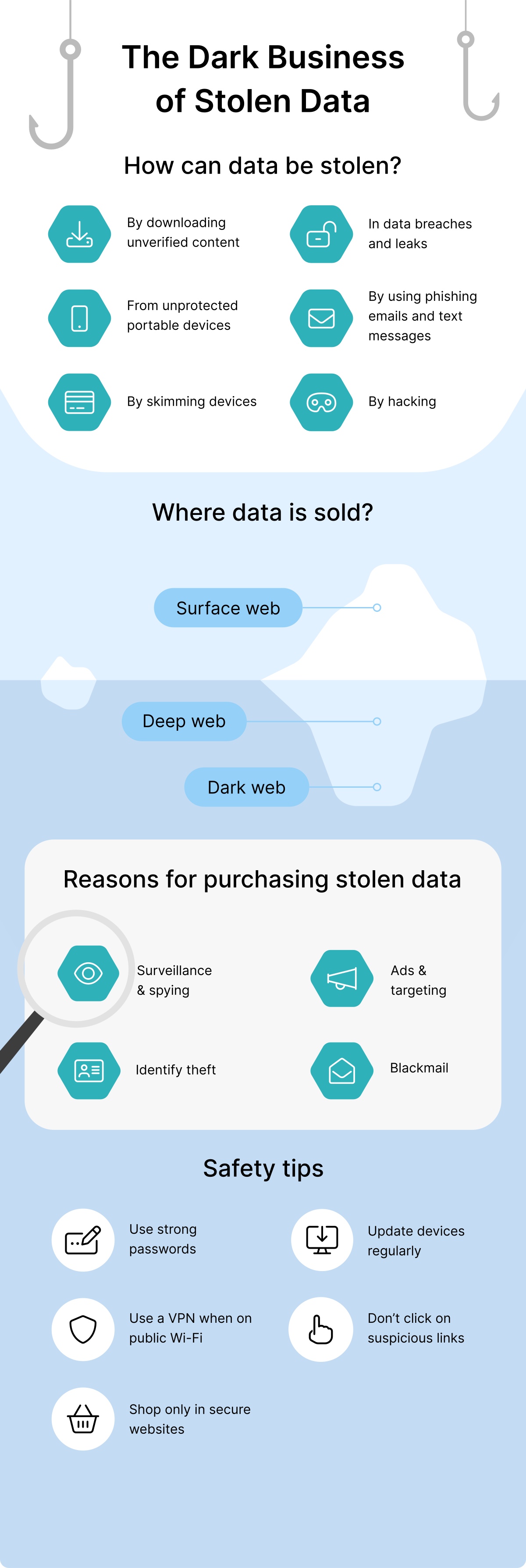
How can data be stolen?
Data theft isn’t just one technique — it’s an entire ecosystem of methods, each targeting different weak points.
1. Downloading unverified content
Free movies, pirated software, “cracked” apps, suspicious browser extensions — these are common delivery vehicles for malware. Once installed, the malware quietly harvests passwords, banking info, and personal files. The “free” download costs you everything.
2. Data breaches and leaks
Even if you do everything right, your data can leak through companies you trusted. Major breaches at Equifax, Yahoo, LinkedIn, and Facebook have collectively exposed billions of records. You can check if your email has appeared in a known breach at Have I Been Pwned — the results are usually sobering.
3. Unprotected portable devices
Lost or stolen phones and laptops are a goldmine for data thieves. If your device isn’t encrypted and password-protected, everything on it — emails, photos, saved logins, banking apps — becomes accessible to whoever finds it.
4. Phishing emails and text messages
You receive an email that looks like it’s from your bank, asking you to “verify your account.” You click the link, enter your credentials, and just handed them to an attacker. Phishing has become so sophisticated that even security professionals get caught. Modern variants include SMS phishing (“smishing”) and voice phishing (“vishing”).
5. Skimming devices
Tiny hardware devices attached to ATMs, gas pumps, and point-of-sale terminals can capture your card details when you swipe or insert your card. Modern skimmers are nearly invisible — even bank employees often miss them during routine checks.
6. Hacking
Direct attacks on individuals are rarer than the methods above (because they require more effort), but they happen — especially against high-value targets. Most “hacking” of regular users is actually one of the methods above, just labeled dramatically by news headlines.
Where stolen data is sold
The internet is bigger than what you see in Google search results. Stolen data circulates across three distinct layers:
Surface web
The internet you use every day — anything indexed by Google, Bing, and similar search engines. Surprisingly, some stolen data appears here too: leaked credentials posted on hacker forums, sample dumps used to advertise larger packages for sale, and stolen accounts traded on social media.
Deep web
Content not indexed by search engines but still accessible via normal browsers: paywalled databases, private forums, academic resources, government records, banking portals. The deep web is mostly legitimate — your bank statements and medical records live here. But private hacker forums also operate in this layer.
Dark web
Hidden networks accessible only through specialized software like Tor. This is where most stolen data ends up: bulk credit card dumps, full identity packages, corporate database leaks, and tools to use them. Dark web markets operate like Amazon — with vendor ratings, customer reviews, and even refund policies.
Why people buy stolen data
Buyers aren’t just shadowy hackers. The market includes a surprising range of actors with different motivations.
Surveillance and spying
Stalkers, abusive ex-partners, and corporate espionage agents pay for personal data to track and monitor specific individuals. Your location history, communications, and online behavior become weapons in someone else’s agenda.
Identity theft
The most direct use: opening credit cards, loans, and bank accounts in your name. Victims often don’t realize they’ve been targeted until months later, when collection agencies start calling about debts they didn’t incur. Cleaning up identity theft takes an average of 200 hours of personal time, according to the FTC.
Ads and targeting
Beyond the criminal use, your data fuels the legal-but-questionable advertising industry. Some data brokers operate in murky legal territory, buying breach data alongside legitimately collected information to build detailed profiles for targeted advertising.
Blackmail and extortion
Sensitive emails, private photos, and embarrassing browsing history become tools for extortion. “Sextortion” scams — where attackers claim to have compromising videos and demand payment — have grown into a billion-dollar criminal industry.
How to protect yourself: 6 practical steps
You can’t eliminate the risk entirely, but you can dramatically reduce your exposure with these habits.
1. Use strong, unique passwords
This is the single most effective thing you can do. Use a password manager to generate and store unique 16+ character passwords for every account. When (not if) one service gets breached, your other accounts stay safe.
For the full guide, see our article on how to create strong passwords.
2. Use a VPN on public Wi-Fi
Airports, cafés, hotels, and shopping malls — public Wi-Fi networks are common hunting grounds for data thieves. A VPN encrypts your connection so anyone snooping on the same network sees only scrambled data instead of your passwords and credit card numbers.
3. Shop only on secure websites
Before entering payment details, check the URL: it should start with https:// (not just http://) and show a padlock icon. If the site looks suspicious, has poor design, or its prices seem too good to be true — close the tab and find another store.
4. Update your devices regularly
Software updates aren’t annoyance — they’re security patches. Most malware exploits vulnerabilities that were fixed months ago, but unpatched devices remain wide open. Enable automatic updates on every device you own: phones, laptops, tablets, smart TVs, even routers.
5. Don’t click on suspicious links
If an email looks even slightly off — unexpected sender, urgent tone, generic greeting — don’t click any links. Instead, navigate to the supposed sender’s website directly through your browser. Banks, Amazon, PayPal, and government agencies will never ask you to “verify” your password via an emailed link.
6. Be cautious with portable devices
Enable encryption on every laptop and phone. Set up “find my device” features so you can remote-wipe a lost or stolen device. Don’t auto-fill sensitive data on devices you take in public.
The role of a VPN
A VPN won’t stop every data theft method — it can’t protect you if a company you trust gets breached, and it won’t prevent phishing if you click a malicious link. But it does close one of the biggest attack surfaces: data interception in transit.
Specifically, a VPN protects against:
- Man-in-the-middle attacks on public Wi-Fi, where attackers intercept your data as it travels to websites.
- ISP tracking, which in many countries logs your browsing for advertising or government surveillance.
- Geographic targeting, where attackers focus on users in specific regions or countries.
- DNS leaks that reveal which sites you visit even when other traffic is encrypted.
Across all nine countries we test in, we recommend NordVPN as the most reliable protection. It uses AES-256 encryption, runs an independently audited no-logs policy, and includes threat protection that blocks known malicious sites before you reach them.
Stop your data from ending up on the dark web.
Get NordVPN with up to 74% off and try it risk-free for 30 days.
Check if you’ve already been exposed
Before assuming you’re safe, take 5 minutes to check whether your data is already circulating.
- Email breaches: Visit Have I Been Pwned and enter your email. The site checks it against known breach databases.
- Password reuse: If you use the same password on multiple sites, change them all immediately to unique ones.
- Bank statements: Review the last 3 months for unfamiliar charges — even small ones. Thieves often test cards with $1-2 charges before larger fraud.
- Credit report: Check for accounts you didn’t open. Most countries offer a free annual credit report.
Final thoughts
The dark business of stolen data exists because billions of people remain easy targets. Most of the methods above succeed not because they’re sophisticated, but because people don’t take basic precautions: weak passwords, no encryption, clicking suspicious links, ignoring updates.
You don’t need to become a security expert. You just need to make yourself a slightly harder target than average — attackers will move on to easier victims. The combination of a password manager, VPN, regular updates, and basic skepticism puts you ahead of 90% of internet users.